preventive maintenance, PM program, maintenance scheduling, PM compliance
A practical guide to running a preventive maintenance program in facilities, covering asset scope, PM tasks, scheduling, automations, and compliance.

Preventive maintenance is the planned work performed to reduce the likelihood of failure and to keep equipment and facilities systems operating within expected conditions. For a full definition and the case for preventive work, see the pillar guide What Is Preventive Maintenance?. This guide is the operational deep dive into running a program: asset scope, defined tasks, a schedule, PM work orders, automations, and compliance. In Layer, preventive maintenance is typically implemented as linked Categories for Assets, PM Tasks, and PM Work Orders, supported by views and scheduled Automations.
How a PM program works in Layer
A preventive maintenance program has four operational components. The first is asset scope, which defines which equipment is included. The second is task definition, which defines what must be done and what counts as complete. The third is scheduling, which assigns a cadence and creates upcoming work. The fourth is documentation, which records completion, evidence, and exceptions. The goal is not only to complete tasks, but also to create a record that supports compliance, reliability, and planning.
Step 1: Start with an asset register and basic criticality
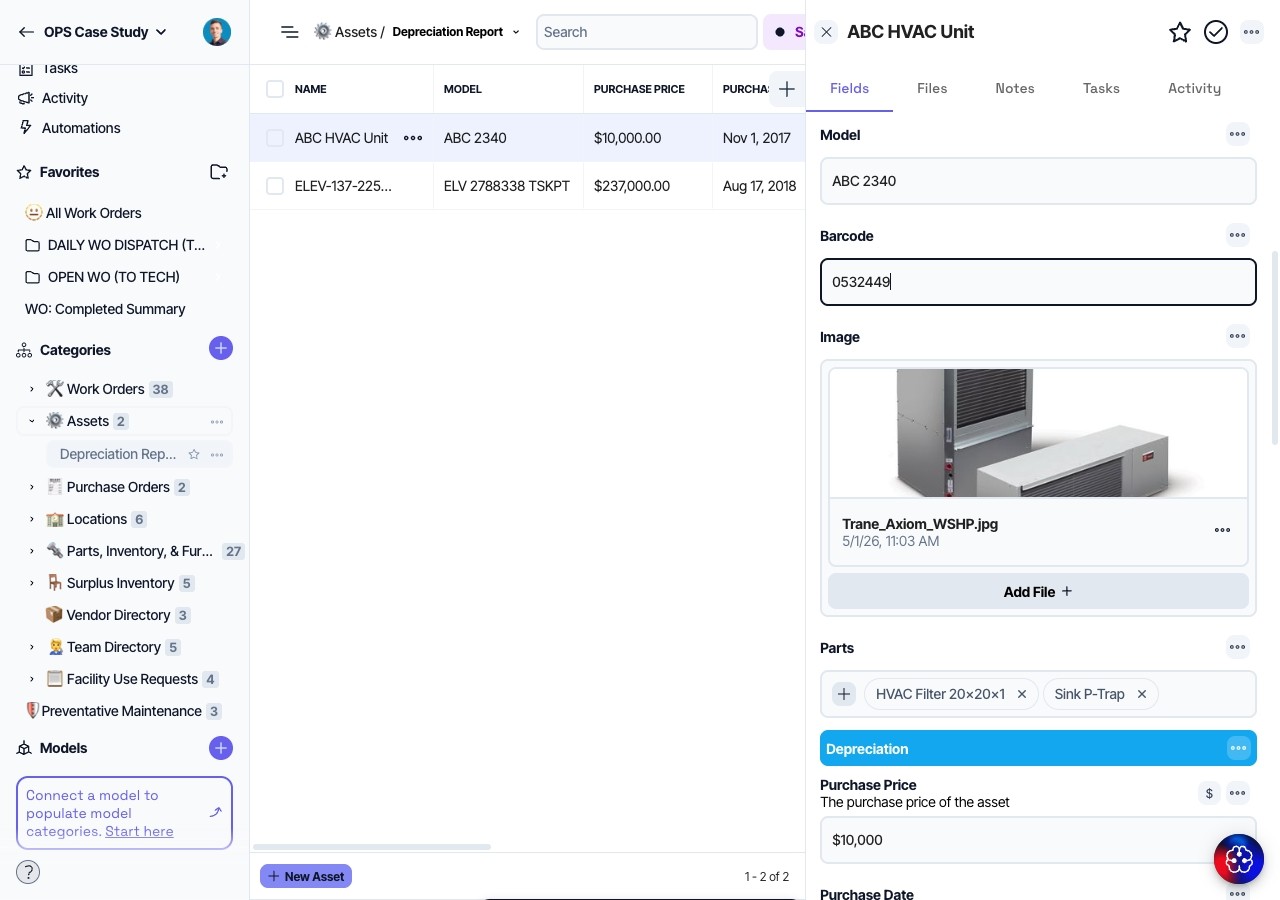
Preventive maintenance scheduling is only as reliable as the asset list. Create an Assets Category if one does not exist, and ensure each asset has a stable Asset ID. Include asset name, system, trade, manufacturer, model, serial, and location. Add a Criticality field with a simple scale such as High, Medium, and Low. Criticality makes it possible to prioritize PM when staffing is constrained and to justify why certain assets receive more frequent attention.
If you are starting from spreadsheets, import existing asset lists and normalize fields during the import process. If the asset list is incomplete, start with the assets most likely to cause downtime, safety risk, or compliance issues.
Step 2: Define PM tasks as repeatable records
Create a PM Tasks Category. A PM task should represent a repeatable unit of work, such as quarterly belt inspection for an air handling unit. Include Task name, Frequency, Step standard, Evidence required, Estimated duration, and Related asset type or Related asset. When tasks are stored as records, it becomes easier to reuse them, revise them, and analyze completion.
Decide whether tasks are generic or asset-specific. Some tasks apply to a class of assets, such as quarterly inspection for all rooftop units. Other tasks are specific to one asset, such as calibration for a particular control panel. Layer can support both, but the program should define how tasks will be created so technicians can interpret them consistently.

Step 3: Choose scheduling rules and completion standards
Frequency is often a mix of manufacturer recommendations, regulatory requirements, and local experience. Define frequencies using a controlled vocabulary such as Weekly, Monthly, Quarterly, Semiannual, and Annual. If the organization uses custom cycles, define them explicitly. Define completion standards as observable checks and measurable actions. When completion depends on evidence, specify what evidence is required, such as photos of a gauge reading, a measured value, or an attachment.
Create a standard for exceptions. PM work often uncovers corrective work, such as a belt that needs replacement. Decide whether the PM record should include the corrective work or whether it should spawn a separate corrective work order linked to the same asset. Most teams create a separate corrective work order so the program can distinguish planned work from unplanned work.
Step 4: Create PM work orders and schedule views
Decide how you will represent PM execution. One approach is a dedicated PM Work Orders Category. Another approach is to reuse the Work Orders Category and add a Work type field with values such as Preventive, Corrective, and Reactive. The advantage of reuse is unified reporting and dispatch. The advantage of a dedicated PM category is simpler status and fewer fields for technicians to navigate. Both are workable, but a unified Work Orders Category is often easier when the team wants one inbox and one history record per asset.
Create views that show upcoming PM, overdue PM, and PM due this week. These views should include asset, location, assigned technician, and completion requirements. Keep the views narrow so they function as operational dashboards, not as a full database view.

Step 5: Use Automations to support recurring work and reminders
Scheduled Automations are a practical way to reduce manual scheduling. A program can start by creating reminders to review upcoming PM at a fixed time each week. As the workflow matures, Automations can create PM work orders on a schedule and notify assigned technicians. Notifications should include the asset, location, and the standard of completion so technicians do not need to search for context.
If you implement automated creation, define how the new record is named. A consistent naming pattern such as "PM, Asset ID, Task name, Due date" makes it easier to scan lists and to avoid duplicates.

Step 6: Track PM compliance and improve the task library
PM compliance is the percentage of scheduled tasks completed within the defined window. Layer supports compliance tracking through status, due dates, and completion dates. Define what counts as on-time. Some teams consider a task on-time if it is completed in the same month or quarter, while others require completion before the due date. Choose a rule that matches how you report to stakeholders and keep it stable.
Use completion notes and exception flags to improve tasks. If a task routinely requires additional steps, update the task standard. If evidence requirements are too strict and cause delays without adding value, revise them. The task library should evolve based on observed work, not only based on initial assumptions.
Tips
Preventive maintenance becomes easier to manage when preventive work is clearly separated from reactive work, even when both live in the same Work Orders Category. Use a Work type field that does not change during the lifecycle. Keep failure and resolution codes consistent so you can compare reactive and preventive work on the same assets.
Avoid starting with a large number of tasks. A small, well-executed PM program usually produces better adoption and better data quality than a large program that is inconsistently completed. Expand scope based on stability, not based on the size of the asset list.
Keep location data consistent across assets and work orders. If technicians cannot quickly select the correct location, they will default to free text and reporting will degrade. Use relationship fields rather than embedding building and room in a single text field.
Keeping the PM program reliable over time
A preventive maintenance program depends on an asset register, a library of repeatable tasks, a schedule, and consistent documentation. In Layer, the program is implemented as Assets linked to PM tasks and work orders, supported by views for upcoming and overdue work, and Automations that reduce manual reminders and scheduling. Over time, the program improves by refining task standards and by using compliance and exception data to focus effort where it reduces risk.