Construction Administration
A guide to writing field reports during construction, including what to include, how they’re used, and how they differ from other documents.


You’re asked to write a field report. What exactly goes into it?
During construction, architects may be contractually responsible for tracking what is happening on site. That includes reviewing installations, verifying conditions, and keeping the client informed of progress. One of the most common ways to document this work is through a field report.
Field reports are not the same as punch lists, RFIs, or safety inspections. They are a structured record of what the architect observes during a site visit. Field reports support communication between teams, help resolve questions, and provide a consistent record of the construction process as it progresses.
This guide explains what field reports are, when to use them, what to include, and how to document them using structured tools like Layer.
What is a field report?
A field report is a formal written record of what an architect observes during a site visit. It usually includes notes on construction progress, work in place, coordination issues, and any conditions that may affect the project schedule or quality.
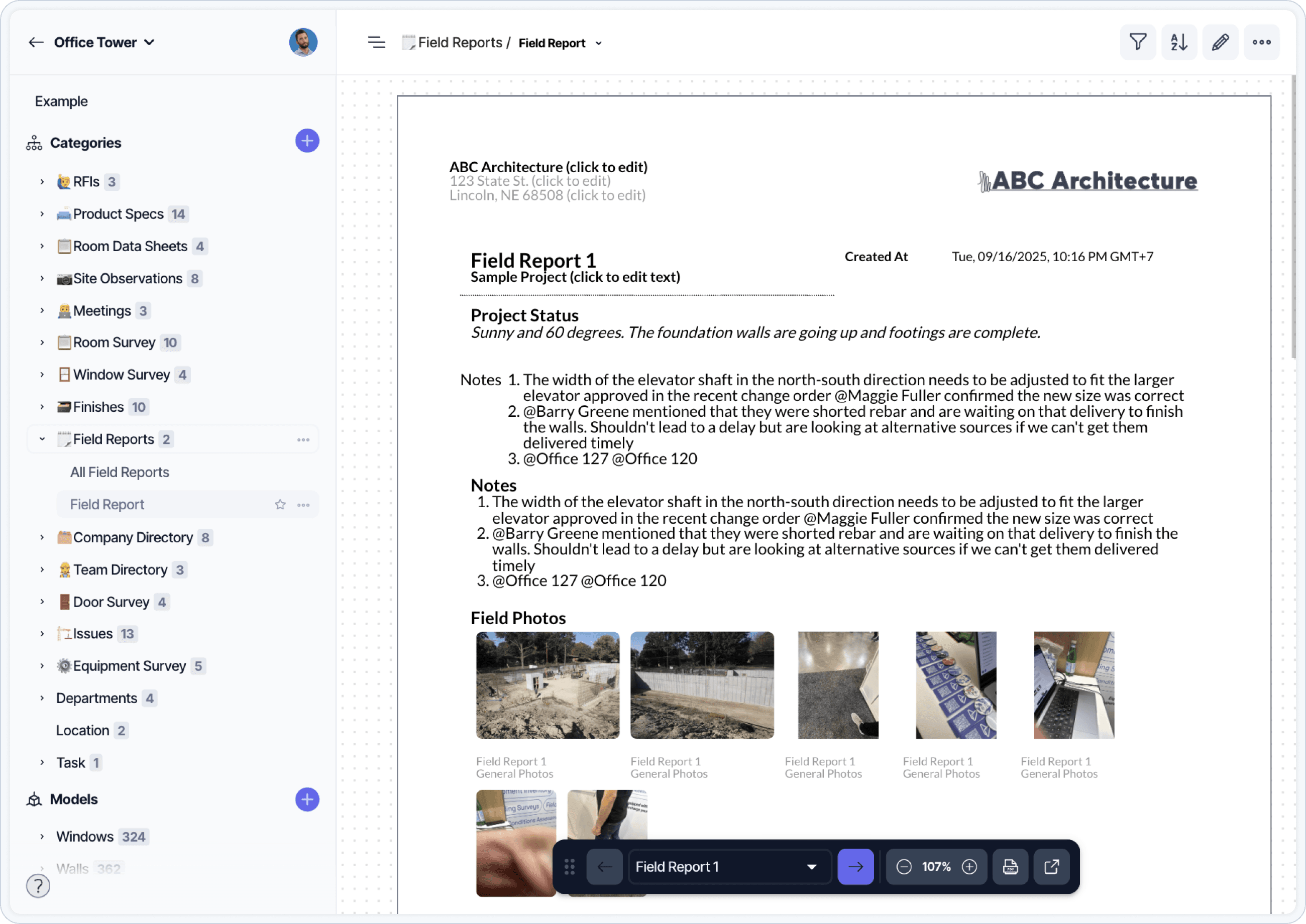
A field report template structured with project details, observations, photos, and follow-up notes.
Field reports are typically issued during construction administration. They are not legal directives and do not replace other contract communications. Instead, they provide a clear, consistent log of observations that can be shared with the contractor, the client, and the project team.
What is the purpose of a field report?
Field reports serve several purposes on a construction project:
Record site conditions at the time of the visit
Track progress against the construction schedule
Identify items that may require follow-up or clarification
Help manage communication between the architect, owner, and contractor
Provide backup documentation in case of disputes or delays
An architect documenting a site visit on a tablet. Capturing observations in the field reduces transcription work later.
Field reports also support internal coordination. They help keep project architects, consultants, and firm leadership informed about what is happening on site.

When do architects issue field reports?
Field reports are usually issued during scheduled or milestone site visits. The frequency of reports depends on the phase of construction, the project type, and the architect’s role.
Common scenarios include:
Regular weekly or biweekly site visits
Verification of completed work before a pay application
Coordination walk-throughs during installations
Pre-pour or pre-cover inspections
Owner walkthroughs or client meetings on site
Observations prior to substantial completion
Architects typically send field reports to the general contractor, the owner, and any consultants involved in the current phase of work.
What should a field report include?
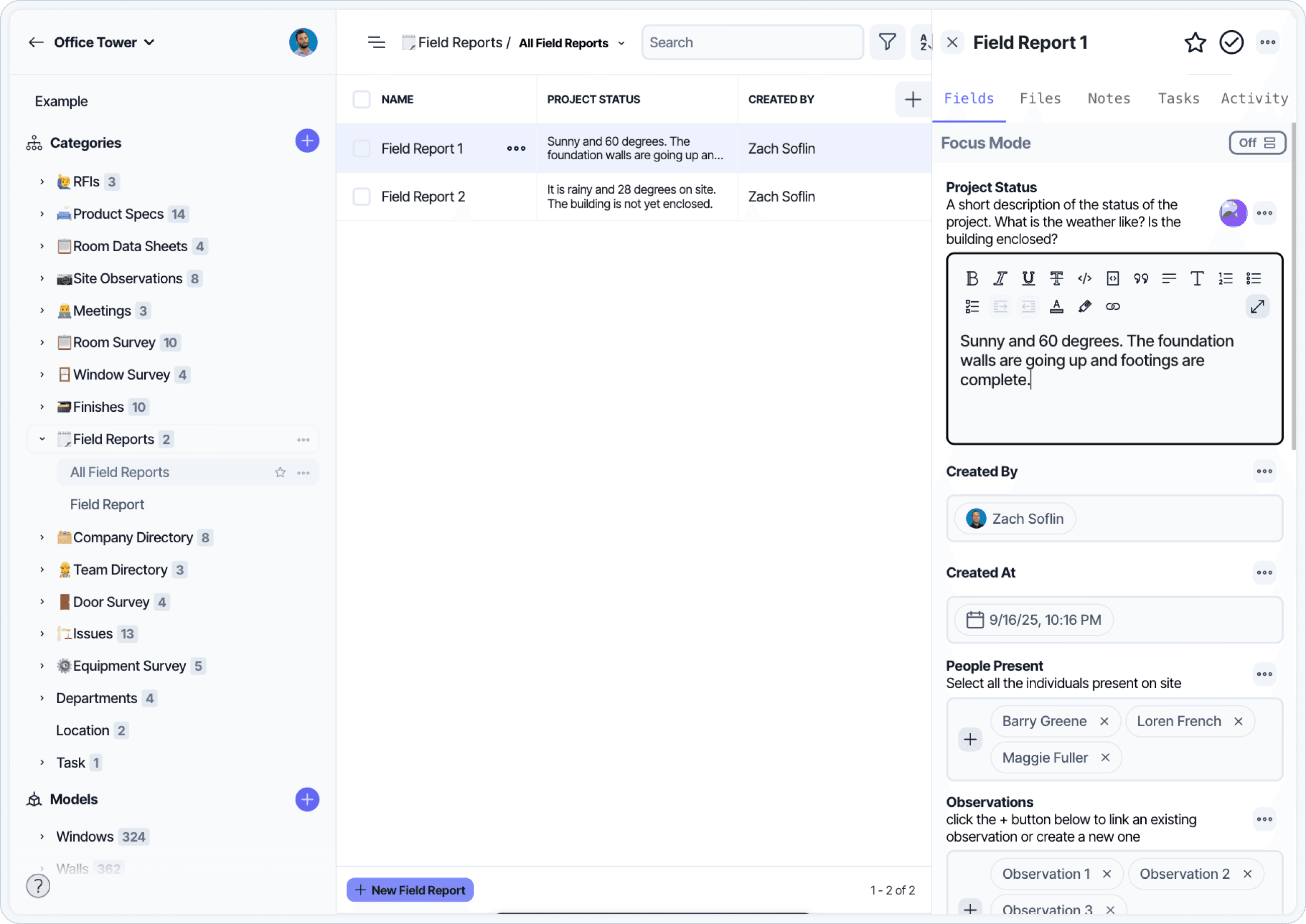
A table view of field reports across a project. Tracking visits and observations in one place supports coordination meetings.
Field reports vary by firm, but most include the same basic structure. A clear and complete report usually contains the following:
Project details
Project name
Report number
Date and time of visit
Weather conditions
Names of team members or consultants present
Work observed
Summary of work in progress
Specific areas or systems reviewed
Observations of completed work
Notes on quality or consistency with drawings
Photos
Clear, labeled photos with context
Locations noted when possible (room number, elevation, floor)
Images that support written notes or document work in place
Coordination notes
Questions raised during the visit
Observations that may affect sequencing or installation
References to submittals, RFIs, or drawings
Access or safety issues
If the architect was unable to access part of the site, that should be documented
Any unsafe conditions that interfered with the visit may also be included
Next steps or follow-up
Notes on items that require review, clarification, or action
Information that needs to be confirmed in a future visit
It’s also important to understand what a field report does not do.
Field reports are not:
A substitution for contract instructions. These should always be followed.
A list of corrections or deficiencies to be resolved
A compliance document for building codes or OSHA
A certification of completion or quality
Architects can use a field report to document that something was observed, but not to issue directions or enforce corrections. Any action that requires contractor response should be handled through a formal process like an RFI, ASI, or meeting minutes.
Field reports are sometimes confused with other types of construction documents. Here is how they compare.
How Field Reports Compare to Other Construction Documents
Document Type | Purpose | Created By | When It’s Used |
|---|---|---|---|
Field Report | Logs general progress and site conditions | Architect | Throughout construction (site visits) |
Lists incomplete or deficient work | Architect and Contractor | Near project completion | |
Safety Inspection | Documents jobsite safety compliance | Contractor or Safety Officer | Daily or weekly, per site requirements |
Tracks requests for information from field to design | Contractor or Architect | As needed throughout construction | |
Submittal Log | Tracks product data, samples, and approvals | Contractor (reviewed by Architect) | Throughout procurement and installation |
Why field reports matter
Clear, consistent field reports support accountability during construction. Field Reports provide a record of what the architect saw, when they saw it, and what conditions were present. This can be helpful in resolving questions about progress, access, or coordination.
Field reports are also a valuable tool for the owner. They offer visibility into the status of the work without requiring daily site presence. For large projects or projects with phased occupancy, this kind of documentation is critical.
Field reports may also be used as backup if there is a claim, delay, or dispute. A well-documented report can help clarify what was observed at a specific point in time.
How to write a field report as an architect

A field report capturing a window inspection. Component-level observations support both progress tracking and warranty documentation.
A field report should be a clear, factual record of what you observed on site during a specific visit. It doesn’t need to capture everything. It just needs to capture what was relevant, visible, and necessary to inform the rest of the team.
Here’s how to structure it.
Start with basic context
Every field report should include the project name, visit date, time of day, and weather conditions. Include names of any consultants or team members who joined you on site. This helps establish the conditions under which the observations were made.
Describe what work was in progress
Note which trades were active, what areas were accessible, and what installations or assemblies were underway. Use floor numbers, room names, or grid references to organize your notes. Avoid general statements like “progressing well”—describe what you actually saw.
Record observations in plain language
Use short, factual sentences. Keep your observations neutral. Avoid suggesting corrections or assigning blame. Instead of writing “ductwork not installed correctly,” write “ductwork observed installed in Room 214. Coordination with sprinkler lines not confirmed.”
Add photos to support key observations
Include clear, well-labeled images when they help explain a condition or document progress. Ideally, each photo should be associated with a specific location or note. If you use a tool like Layer, you can attach images directly to individual observations to avoid confusion later.
Note access limitations or safety issues
If you were unable to access part of the site, include that in the report. Explain why, and state whether the area will need to be reviewed again. For example, “Unable to enter Mechanical Room 3B due to active welding. Will reschedule review during next site visit.”
Reference related coordination items when needed
If your observations relate to an open RFI, submittal, or coordination issue, include a short reference. You do not need to restate the item, just connect your note to the correct thread. This helps keep your report relevant without duplicating other documentation.
Keep formatting consistent
Use the same structure for each visit. If your firm doesn’t have a template, start with a repeatable format that includes a cover section, structured notes, and photo references. A template-based workflow, like the one in Layer, can make this process more efficient.
Archive the report and share it if required
Field reports may be required as part of the contract or just for internal coordination. Make sure they’re stored where others can access them, and confirm whether the owner or contractor expects to receive a copy. If needed, export a clean PDF for submission.
Frequently Asked Questions
What is a field report?
A field report is a formal written record of what an architect observes during a site visit. It typically includes notes on construction progress, work in place, coordination issues, and any conditions that may affect the project schedule or quality. Field reports are issued during Construction Administration.
How is a field report different from a punch list?
A field report logs general progress and observed conditions throughout construction. A punch list specifically catalogs incomplete or deficient work near project completion. Field reports are issued throughout CA; punch lists are typically generated once at substantial completion.
How is a field report different from an RFI?
A field report documents what was observed during a site visit. An RFI is a formal request for clarification on construction documents. Field reports are not legal directives; RFIs are part of the formal contract communication process. Observations in a field report may lead to RFIs but do not replace them.
Who receives a field report?
Field reports typically go to the general contractor, the owner, and any consultants involved in the current phase of work. Internal copies may also go to project architects, firm leadership, and design consultants for coordination purposes.
How often should architects issue field reports?
Frequency depends on project complexity and the architect’s contract. Common cadences are weekly or biweekly during active construction, plus additional reports for milestone visits like pre-pour inspections, pay application verification, or owner walkthroughs.
What should I include in a field report?
Project details (name, date, weather, attendees), description of work in progress, photos with location context, coordination notes, references to related RFIs or submittals, access or safety limitations, and any items requiring follow-up. Avoid suggesting corrections or assigning blame; keep observations factual and neutral.
What is the legal weight of a field report?
Field reports document observations but do not direct the contractor to take action. They are not legal directives. Any required action should be handled through formal channels (RFI, ASI, change order, or meeting minutes). However, field reports are valuable backup documentation if disputes arise about progress, access, or coordination.
Further Resources
Clear, consistent field reports are a critical part of construction administration. They support team coordination, provide backup documentation, and help track work in progress across the project timeline.
Here are additional resources that may help: