Interior Design
Learn what FF&E means in architecture and interior design, including definitions, workflows, budgeting, procurement, installation, and digital management tools.

FF&E stands for Furniture, Fixtures, and Equipment. The term describes the movable objects within a building that support its functional use, including furniture, lighting, appliances, and specialized equipment. FF&E items are not permanently affixed to the structure. A common test: if you picked up a building, turned it upside down, and shook it, everything that fell out would be considered FF&E. FF&E is relevant in architecture, interior design, construction, facility management, and operations.
FF&E represents a significant portion of a project's cost, operational functionality, and long term maintenance requirements. The selection, documentation, procurement, installation, and handover of FF&E requires coordination among designers, owners, contractors, procurement agents, and suppliers.
FF&E at a Glance
Category | Description | Typical Examples | Included in FF&E |
|---|---|---|---|
Furniture | Movable objects placed in a space | Chairs, desks, beds | ✅ Yes |
Fixtures | Semi permanent items attached to surfaces | Wall shelving, pendant lights | ✅ Yes |
Equipment | Devices and tools needed for operations | Medical equipment, ovens, printers | ✅ Yes |
Millwork | Built in casework | Kitchen cabinets, reception desks | ❌ No |
Plumbing Fixtures | Permanently installed plumbing items | Sinks, toilets | ❌ No |
MEP Systems | Building systems | HVAC, electrical wiring | ❌ No |
Definition of FF&E
FF&E consists of three primary categories:
Furniture
Furniture consists of movable items that support the functional program of a space. These objects do not require construction labor to relocate. Examples include:
Chairs
Tables
Desks
Benches
Storage units
Soft seating
Beds
Furniture is by definition fully movable and does not require building modification for installation.

Workstation casegoods and seating in a commercial office. Movable furniture is the most common FF&E category in office and commercial interiors.
Fixtures
Items that attach to a surface in a semi permanent manner. Fixtures do not require significant demolition or reconstruction to relocate. Examples include:
Wall mounted shelving
Pendant lights
Sconces
Coat hooks
Display systems
Fixtures differ from elements that are permanently fixed to the building structure.
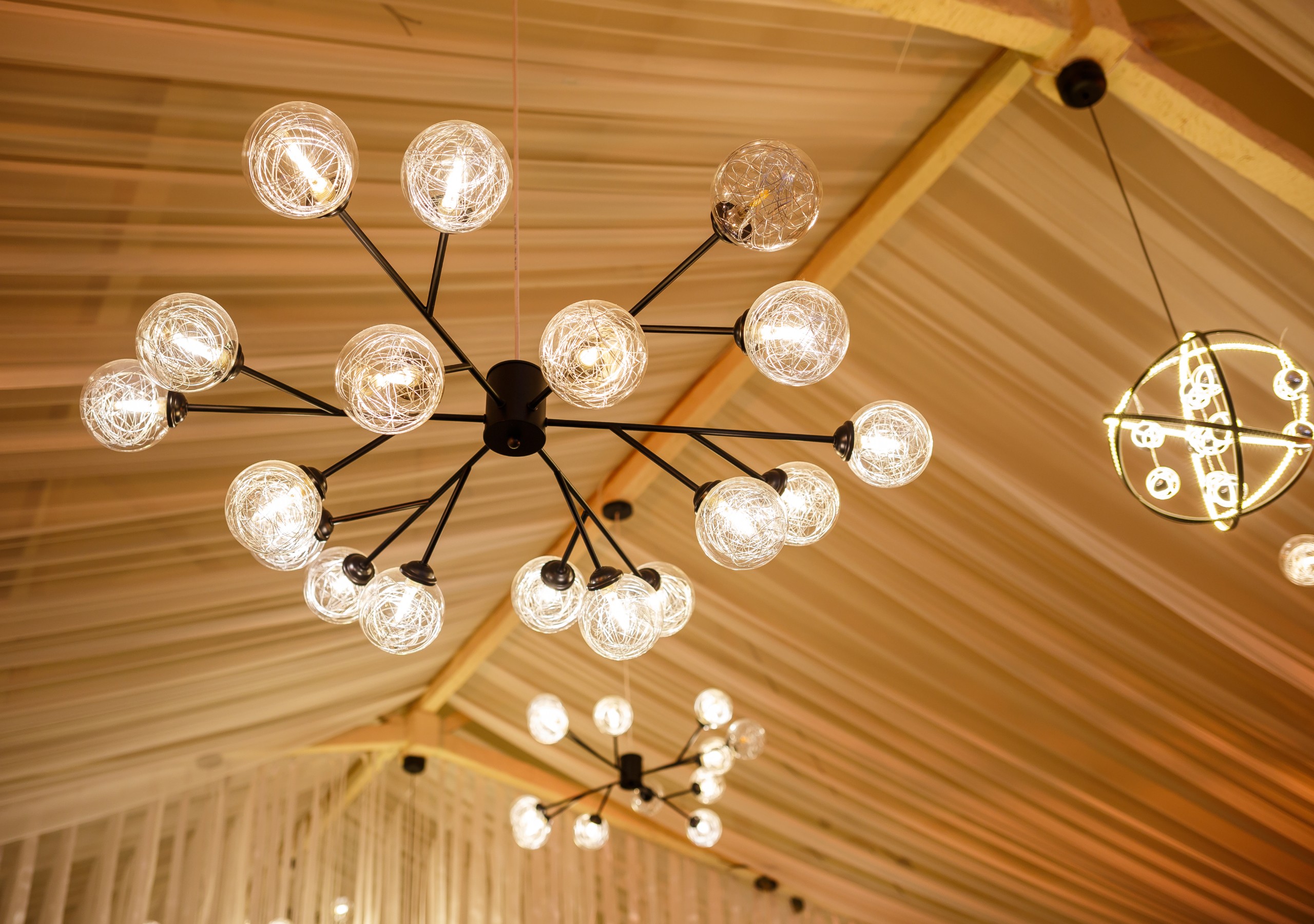
A pendant fixture mounted to a ceiling junction box. Decorative lighting like this is FF&E. Recessed or integrated lighting is typically classified within MEP scopes.
Equipment
Equipment includes specialized tools, appliances, and devices needed for the operation of a facility. These items may require electrical or plumbing connections but are not permanently integrated into the building. Examples will vary significantly by the buildings use, here are some examples:
Medical devices such as imaging equipment
Food service appliances such as ovens and refrigeration units
Audio visual equipment in a school auditorium or church
Office equipment such as printers and plotters
Laundry equipment in hotels, hospitals, and service businesses
Equipment may require power and plumbing but is still considered FF&E if not permanently integrated into the building structure.
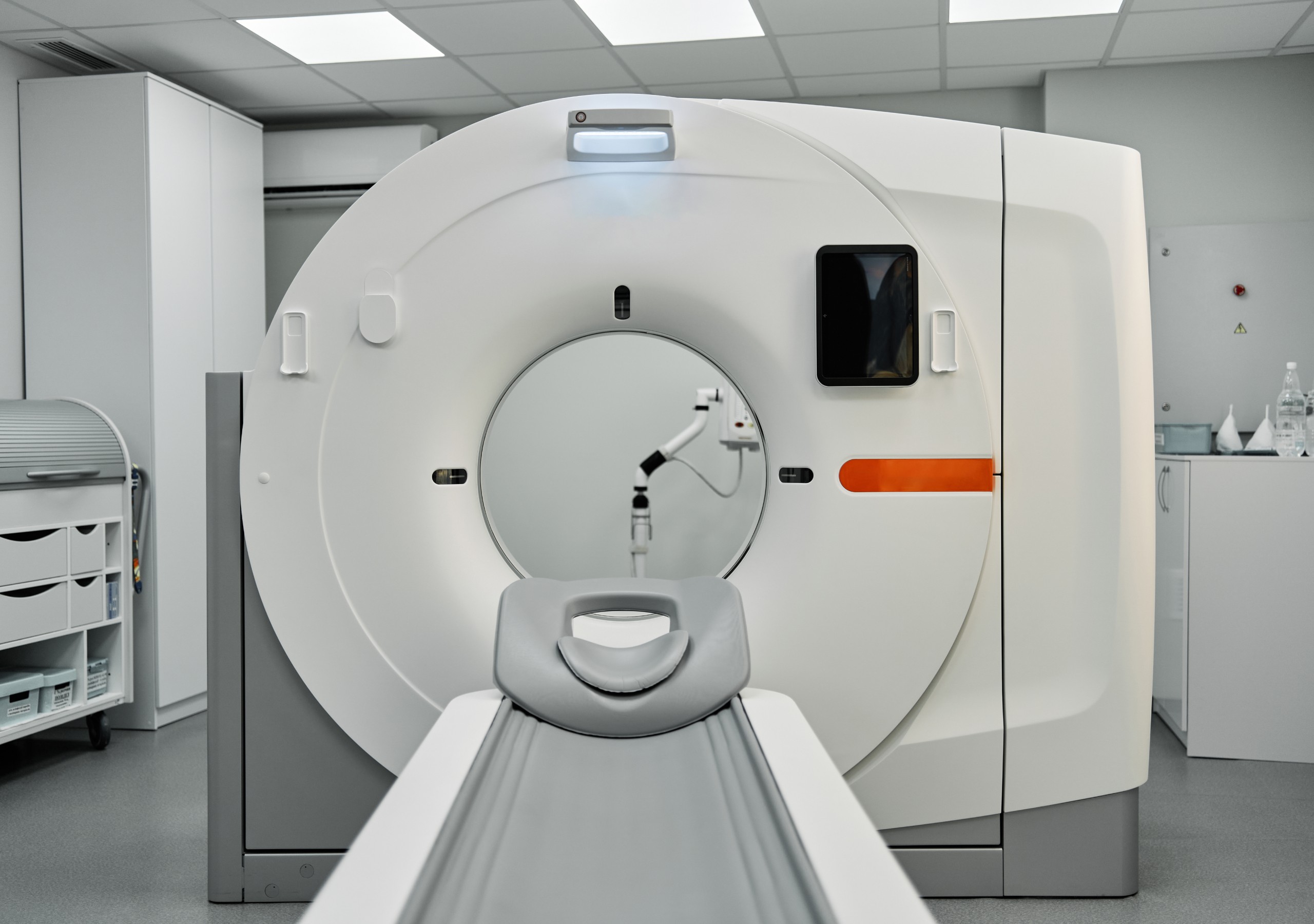
Diagnostic imaging equipment in a healthcare suite. Specialized medical equipment is FF&E even when it requires power, plumbing, and structural reinforcement.
What FF&E Does Not Include
FF&E does not include building components that are permanently affixed or require construction labor for installation. Exclusions include:
Millwork and casework that is built into the structure
Plumbing fixtures such as sinks and toilets
Mechanical, electrical, and plumbing systems
Structural components
Non movable partitions
Fire suppression systems
These items fall within architectural or MEP scopes of work.

Plumbing fixtures connected to a building water supply. Sinks, toilets, and similar permanently installed plumbing are not FF&E.
Related Terms
OS&E (Operating Supplies and Equipment)
Consumable items and small equipment used in the daily operation of a facility. Common in hospitality and healthcare. Examples include linens, cutlery, housekeeping carts, and small appliances.

Folded linens staged for a hotel guestroom. Linens, cutlery, and similar consumable items are OS&E rather than FF&E.
OFCI (Owner Furnished, Contractor Installed)
The owner supplies the FF&E item and the contractor installs it. This method is used when owners prefer control of product selection or volume purchasing.
Read more about managing OFCI efficiently →
CFCI (Contractor Furnished, Contractor Installed)
The contractor is responsible for supplying and installing the FF&E item. This method is used when procurement and installation are included in the contractor’s scope.
OFOI (Owner Furnished, Owner Installed)
The owner provides and installs the item. This procurement method usually applies to small or low risk equipment.
Casegoods vs Loose Furniture
Casegoods refers to built casework and semi fixed cabinetry.
Loose furniture refers to movable items that are not attached to the structure.
FF&E Across Industries
FF&E varies depending on building type. Examples include:
Hospitality
Guest room beds, pillows and bedding
Casegoods
Soft seating
Kitchen and laundry equipment
Outdoor furniture
Decorative elements
Lamps and other additional lighting
A hotel guestroom showing typical FF&E: bed, casegoods, lamps, soft seating, and decorative elements. Hospitality projects often manage hundreds of FF&E items per room type.
Healthcare
Patient beds
Medical imaging devices
Treatment chairs
Nurse station equipment
Infection resistant surfaces
Office
Workstations
Office chairs
Conference room tables
Presentation equipment
Education
Student desks
Lab equipment
Library shelving
Audiovisual systems

An education FF&E setup with student desks, chairs, and audiovisual equipment. K-12 and higher education projects typically procure FF&E in coordinated bid packages by classroom type.
Retail
Display cases and shelves
Point of sale equipment
Lighting
Each sector has distinct requirements related to durability, safety, and operational performance.
The FF&E Lifecycle
The FF&E lifecycle typically involves the following phases. For a step-by-step walkthrough of how each phase plays out on a project, including stakeholder responsibilities, common workflows, and where projects most often slip, see The FF&E Process: 6 Phases from Schematic Design to Handover.
1. Programming and Schematic Design
Preliminary identification of FF&E needs and quantities. Designers often produce early test fits to evaluate space planning.
Read the Interior Design Process Explained →
2. Design Development
Detailed specifications begin. Product research, vendor evaluations, finishes, model numbers, and special requirements are documented. Design intent is reviewed with client.
3. Budgeting
FF&E budgets are developed and reconciled. Costs include base unit price, freight, warehousing, taxes, installation, and contingency.
4. Specification and Documentation
Cut sheets, elevations, schedules, and product data sheets are compiled. Technical requirements are reviewed. Substitutions and alternates may be evaluated.
Read how to connect FF&E to Revit Workflows →
5. Procurement
Orders are placed, lead times are tracked, purchase orders are managed, and logistics are coordinated.
Read FF&E Procurement Explained →
6. Delivery and Installation
Items arrive at the warehouse or site. Inspections occur to confirm condition and compliance with submittals. Installation is coordinated with trades.
7. Punch List and Closeout
Non conforming or damaged items are replaced or repaired. Manufacturers’ manuals, warranties, and asset data are organized.
Read everything you need to know about construction punch lists →
8. Operations and Maintenance
Owners use FF&E data for maintenance, reordering, and lifecycle planning.
Read the FF&E Process Explained →
Roles and Responsibilities
Multiple parties contribute to FF&E delivery. We’ve outlined some of them below.
Interior Designers
Select furniture, fixtures, and equipment
Develop specifications and design intent drawings
Coordinate with consultants and vendors
Present options to clients
See Layer Solutions for Interior Designers →
Owners
Approve selections and budgets
Define functional requirements
Lead OFCI or OS&E procurement when applicable
See Layer Solutions for Building Owners →
Procurement Agents
Manage bidding, pricing, and vendor negotiations
Place orders
Track lead times
Inspect deliveries
Manage warehousing and logistics
General Contractors
Coordinate site readiness
Install contractor furnished and OFCI items
Provide temporary storage if required
See Layer Solutions for General Contractors →
Vendors and Manufacturers
Supply product samples
Provide technical data
Produce shop drawings for custom items
Common Coordination issues
Issue | Description | Impact |
|---|---|---|
Lead time variability | Suppliers may have different manufacturing and shipping timelines | Delays and re-sequencing |
Discontinued products | Items may be discontinued mid-project | Requires alternates |
Freight damage | Items may arrive damaged | Replacements delay installation |
Quantity discrepancies | Drawings, schedules, and procurement logs may not align | Budget overruns |
Storage needs | Items arriving early require warehousing | Added cost and risk |
Budgeting and Cost Factors
FF&E budgets vary by project type and quality level. Typical cost considerations include:
Base unit cost
Freight and delivery fees
Warehousing
Installation labor
Taxes and duties
Crating and packaging
Long lead time risk
Warranty and service costs
Budget overruns commonly occur due to scope changes, discontinued products, long lead times, or brand standards. Read the FF&E Procurement Process Explained →
Compliance and Standards
FF&E is subject to numerous codes and standards. Requirements vary by jurisdiction.
Accessibility
FF&E placements must comply with accessibility regulations such as the Americans with Disabilities Act (ADA). Clearances, reach ranges, and operability standards must be considered.
Fire Ratings
Some materials require flame resistance certifications such as California Technical Bulletin 117 or NFPA 701.
Health and Safety
Healthcare environments may require antimicrobial materials and infection control compliance. Facility Guidelines Institute standards often apply.
Sustainability
Many projects follow LEED, WELL, or similar frameworks. FF&E must meet certification requirements related to emissions, recyclability, or sourcing.
Documentation Requirements
FF&E documentation may include:
Product data sheets
Cut sheets
Finish samples
Shop drawings
Warranty documentation
Inventory lists
Maintenance instructions
Closeout manuals
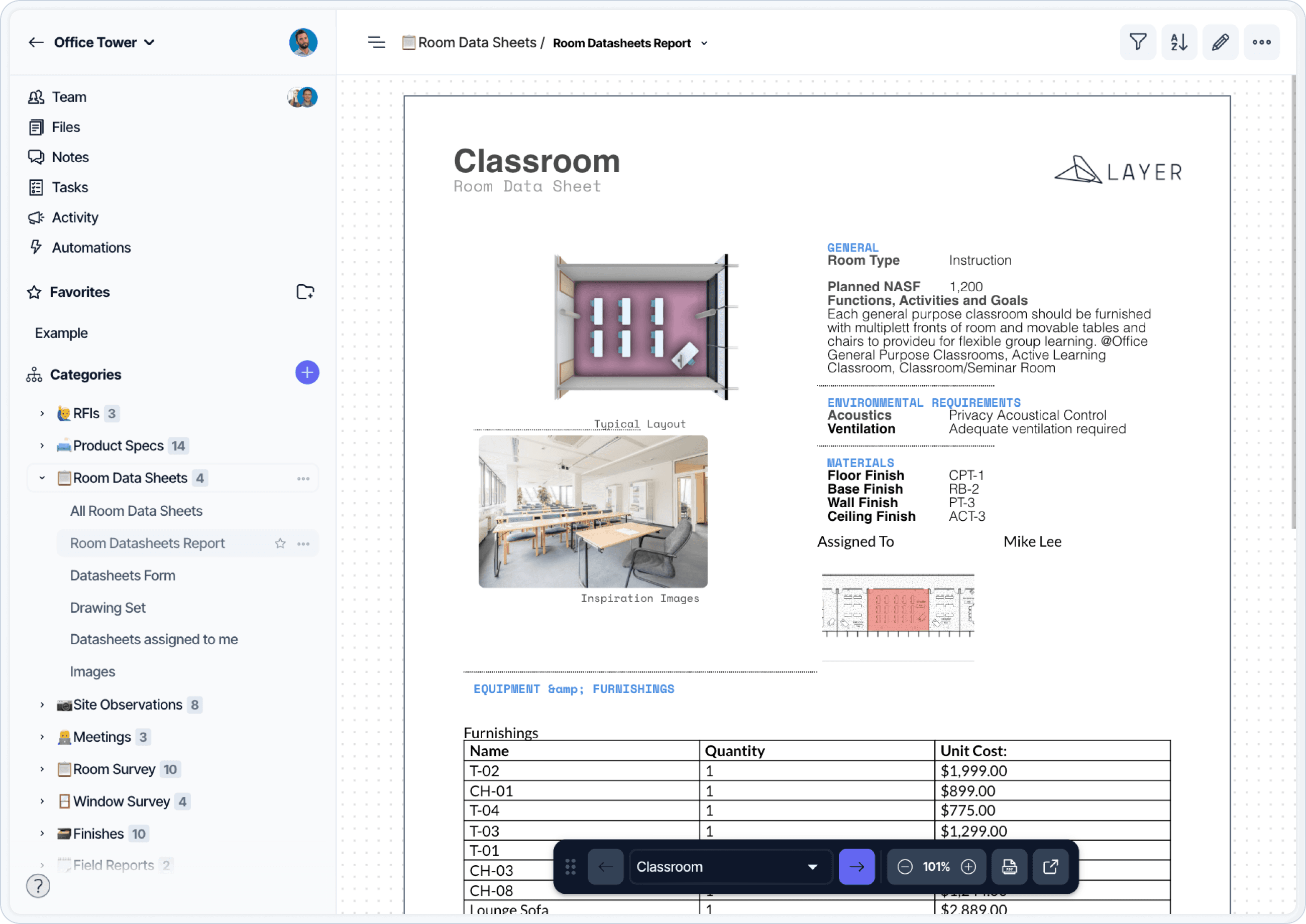
An FF&E room data sheet documenting fixtures and equipment for a single room. Room-by-room documentation is one of the highest-volume artifacts in FF&E management.
A structured digital system is typically required due to the volume of data. Tools like Layer can help you manage this process and create documentation faster than using generic business systems like Microsoft Excel or Word processing tools.
FF&E Procurement
Procurement involves sourcing, purchasing, and follow through.
Sourcing
Identifying products that match design intent, quality requirements, schedule, and budget.
Purchasing
Issuing purchase orders, confirming pricing, approving shop drawings, and coordinating accounting.
Follow Through
Tracking shipping, warehousing, delivery, installation, and final inspections.
Large projects often use procurement agents due to the volume of vendors and products.
Digital Tools for FF&E Management
Modern FF&E workflows use digital systems to organize data, synchronize design information, and enable collaboration.
Layer as a Flexible Database for FF&E
Layer provides a database environment that links directly to BIM models. FF&E items placed in Revit can be displayed in Layer where non Revit users can add contextual information such as cost, finishes, warranty data, alternates, delivery status, and installation notes.
Common Uses of Layer in FF&E Workflows
Centralized FF&E specification library
Budget tracking
Vendor directory
Review and approval workflows
Digital mood boards and concept boards
Warehouse and delivery tracking
Punch list and installation checks
Owner’s manuals linked to the digital model
Layer reduces data fragmentation by unifying schedules, cut sheets, images, and Revit parameters.
FF&E and Revit Integration
FF&E is frequently modeled in Revit. Coordination with Revit requires consistent data structures.
Key integration steps include:
Attaching the Revit model to a database platform
Mapping Revit parameters to custom fields
Tracking instance data such as room placement
Synchronizing approved changes back to the model
Generating schedules and reports
A linked system ensures that procurement and installation teams always have access to current data.
Frequently Asked Questions
What does FF&E stand for?
FF&E stands for Furniture, Fixtures, and Equipment. It refers to movable items within a building that support its functional use, including furniture, lighting, appliances, and specialized equipment. FF&E items are not permanently affixed to the building structure.
What does FF&E mean in construction?
In construction, FF&E refers to movable items that arrive after the building shell and finishes are complete. FF&E coordination during construction administration involves submittal review, field verification of rough-ins, lead time tracking, and installation oversight. For a deeper look, see FF&E in Construction Administration.
What is FF&E in interior design?
In interior design, FF&E describes the furniture, fixtures, and equipment that designers select, specify, and procure as part of a project. The interior designer is typically responsible for documenting FF&E selections, presenting them to the client, and coordinating with procurement and installation teams.
Is millwork included in FF&E?
No. Millwork and built-in casework are not FF&E. They are permanently attached to the building structure and fall under architectural scopes of work. Movable cabinetry and standalone storage units are FF&E.
What is the difference between FF&E and OS&E?
OS&E stands for Operating Supplies and Equipment. OS&E covers consumable items and small operational equipment such as linens, cutlery, and housekeeping carts. FF&E covers larger, longer-lifespan items such as furniture, lighting, and appliances. Hospitality and healthcare projects often track both separately.
Who manages FF&E on a project?
FF&E is typically a shared responsibility. Interior designers select and specify items, owners approve selections and budgets, procurement agents manage sourcing and logistics, and contractors handle installation and coordination with adjacent trades. On smaller projects, a single team may handle multiple roles.
When does FF&E procurement start?
FF&E procurement usually begins after design intent is approved and the construction budget is finalized. Lead times often extend several months, so procurement runs in parallel with construction rather than after it. See FF&E Procurement Explained for a phase-by-phase walkthrough.
Additional FF&E Management Assets
A structured Excel template that supports FF&E specification, cost tracking, and vendor data for large-scale projects.
A ready-to-use room data sheet template designed for documenting FF&E and equipment within rooms, supporting downstream workflows.
Layer Workflow Templates
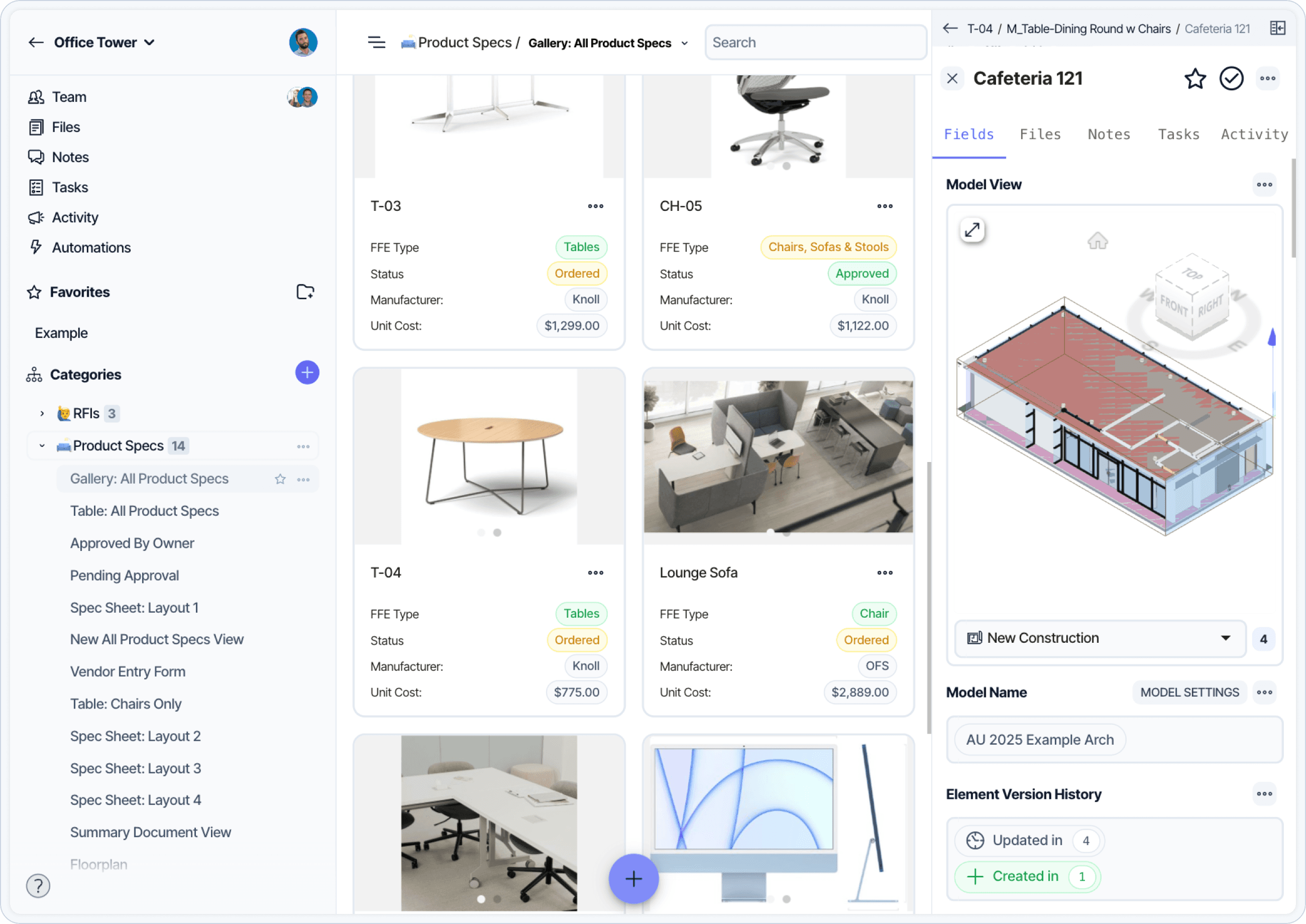
FF&E elements modeled in Revit, linked to a Layer database where non-Revit users can view current quantities, locations, and specification data.
A pre-configured Layer workflow that aligns FF&E data, procurement status, and model integration across project teams.
A Layer workflow template focused on room-level data capture for FF&E, fixtures, and equipment, facilitating coordination between design, procurement, and construction. Use to create customized spec sheets that match your company’s standards that are easily kept up to date with your construction documents.